Import from JSON sample file
Description
Message types can be created from a sample JSON file. The created message type is going to match the given sample. Conceptually this works only if the sample file contains all variations of the expected message type structure.
Import Steps
To create a message type from a sample JSON, choose the Import option "Message Type - File import":
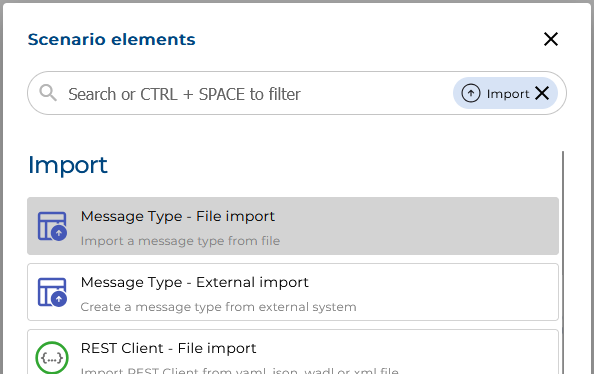
A file selection dialog opens and requests you to upload a file.
As soon as you choose a sample message file in JSON format (extension .json) and start the upload process, you will be presented the specific File Import options.
File Import Options
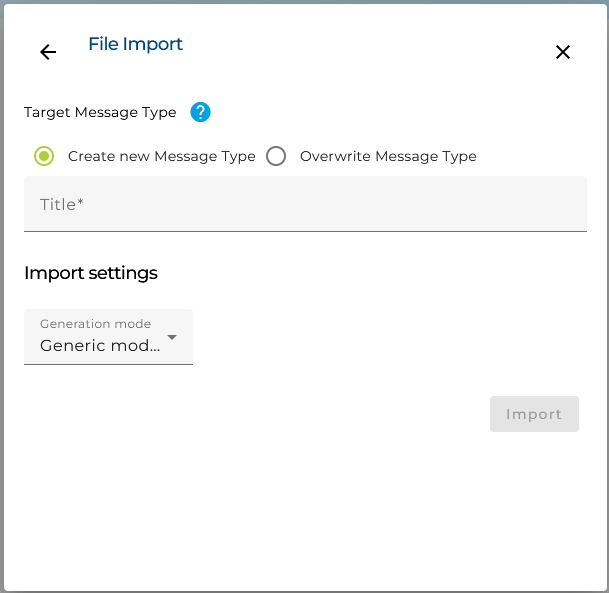
Now, you have to take several decisions:
- Create a new Message Type or change/overwrite an existing one.
- Add the Message Type's name (Title).
- Specify which kind of Message Type you want to be created (Generation mode):
- Standard Message Type: will create a message type usable to configure the JSON deserializer and JSON serializer working in typed mode
- Generic mode Message Type: will create a slightly different message type because the messages created by the generic deserializer contain additional meta information, e.g. the attribute isArray. These difference are reflected in the message type so you can safely use it to validate the messages against the message type.
Finally, hit the button "Import" to create the message type.